FIELD & INSPECTION REPORTING · 8 MIN READ
How to Stop Retyping Field Notes Into Inspection Reports
If the technician already recorded the measurement, observation or condition in the field, typing the same fact into the final report later is not data collection. It is duplicate entry.
For the underlying technical principles, NIST's metrological traceability guidance explains documented measurement relationships, while W3C's PROV model defines how information can be linked to its sources and transformations. These sources describe the underlying concepts, not ACTUALin performance.
Published September 25, 2026 · ACTUALin Technical Resources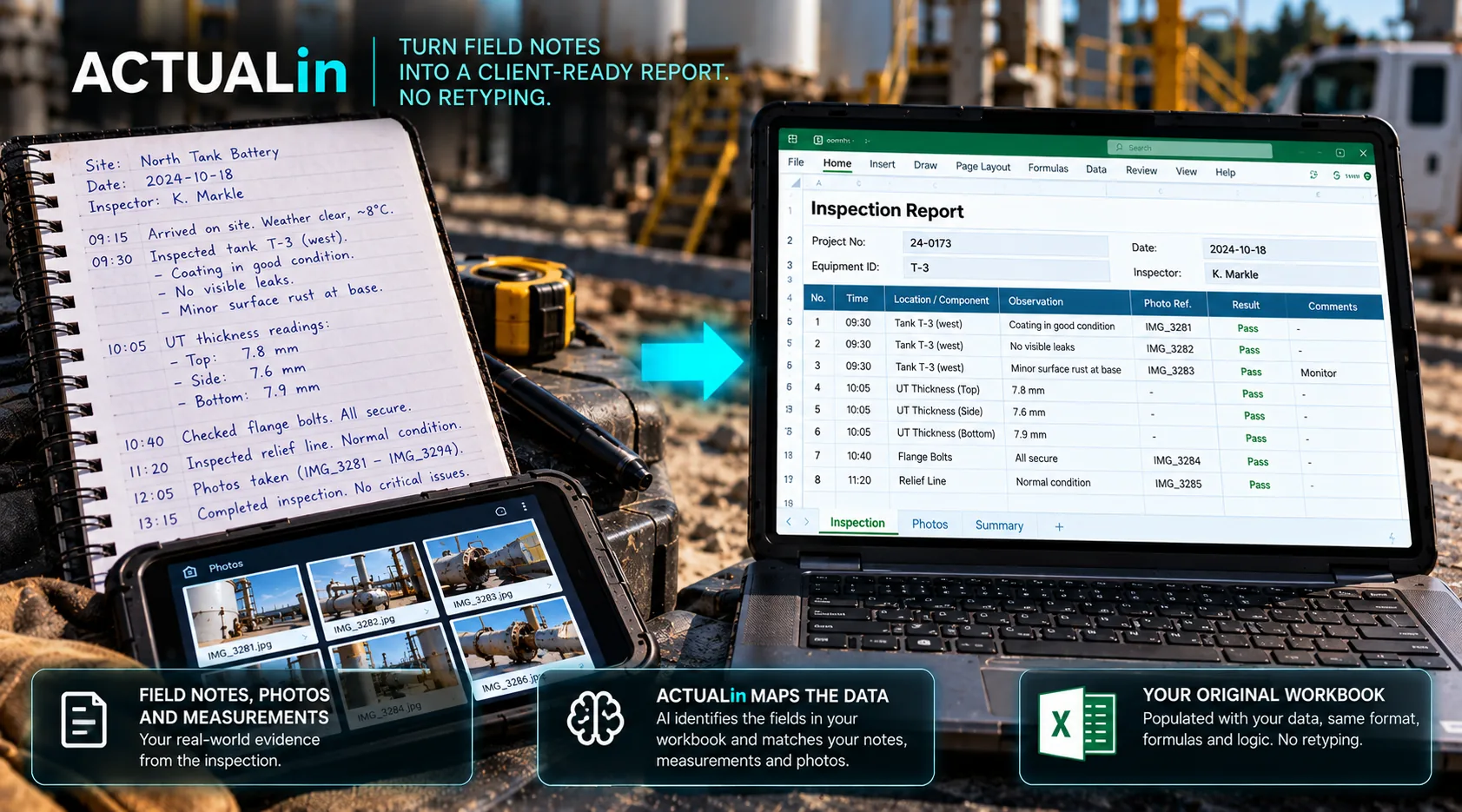
To stop retyping field notes into inspection reports, capture the original observations once and map them into the existing report with the right equipment and inspection context. Review proposed destinations before generating the workbook. This removes duplicate transcription without requiring technicians to abandon their notes, customer templates or technical approval process.
A surprising amount of inspection reporting happens after the useful information has already been captured. The fieldwork is complete. Measurements exist. Observations have been written down. Photos have been taken. Asset details are known.
Then someone opens the report and starts entering the same information again.
Entering field notes a second time is often treated as a normal part of reporting. But it creates time, transcription risk and a disconnect between the evidence captured in the field and the document ultimately delivered to the customer.
Why do technicians have to retype field notes into reports?
Technicians retype notes when field capture and the final report use separate documents without a reliable evidence-to-field handoff. Field evidence and final reports often live in different places. Notes may be typed into a phone, written on paper or stored in another document. Measurements may come from an instrument or worksheet. Photos live in a camera roll. The client deliverable may be an Excel workbook.
The problem is not that any one of those tools is necessarily wrong. The problem is the manual translation step between them.
Capture evidence → finish fieldwork → reopen evidence → interpret it again → retype it into the report → review it again
Every additional handoff creates another opportunity to lose context, transpose a value or place correct information in the wrong report section.
Why “just type it into the report in the field” is not always the answer
One response is to make the final report the data-entry interface. That can work for simple forms, but many technical reports were designed as deliverables rather than field tools.
A workbook may be awkward on a phone or tablet. It may contain multiple sheets, merged sections, formulas or customer-specific formatting. A technician may also need to focus on the inspection itself rather than navigate a complex report while performing the work.
The better goal is not necessarily to force field capture into the final workbook. It is to make the evidence captured during the work reusable afterward.
Capture once, then preserve the context
A measurement becomes much more useful when it stays connected to the asset, area or inspection point it describes. The same is true for an observation or photo.
Instead of flattening everything into a pile of notes that must be interpreted again later, a reporting workflow should carry as much context as possible from capture into report preparation.
Field evidence context can include the component, location, method, sequence, nearby observations or other information that helps distinguish one repeated report section from another.
Interpret the evidence against the report
Removing retyping does not mean blindly copying text from notes into Excel. The final report has its own structure. Labels, sections and surrounding fields help define what belongs where.
A useful automation layer interprets the evidence and the destination workbook together. It can propose that a particular measurement belongs in a specific field because the surrounding workbook context and field evidence support that association.
Field notes + measurements + observations → interpret against existing workbook → proposed report changes → human review → approved report
Repeated fields are where context matters
Inspection reports frequently repeat the same labels across components, locations or test areas. A simple text match may find several cells labelled “Reading,” “Condition” or “Result.”
The automation problem is therefore not finding a matching label. It is identifying the correct occurrence.
If the evidence does not contain enough context to make that distinction safely, the system should flag the association instead of filling the first plausible field.
Retyping creates more than a time cost
Manual transcription adds another opportunity for a correct field observation to become an incorrect report entry. Digits can be transposed. Units can be omitted. Similar values can be assigned to the wrong component. A sentence can lose the context that made it meaningful in the field.
Human review remains necessary, but review is more valuable when it is checking proposed associations rather than spending time recreating information that already exists.
The review step should move earlier
In a traditional workflow, the reviewer often sees the information only after it has already been manually entered into the workbook. That makes the completed report the first place where a mapping mistake becomes visible.
A proposed-change workflow moves review ahead of the final write. The technician or reviewer can see the evidence, destination and proposed value together, then approve, reject or correct the association before generation.
You do not need perfect field data to remove duplicate entry
Structured field capture can make automation easier, but requiring a completely redesigned field process can defeat the purpose. Real inspection evidence is not always perfectly standardized.
A practical system should be able to work with representative notes and evidence while remaining conservative about ambiguity. Better structure can improve results over time without making a new rigid capture system a prerequisite for getting value.
What the shorter workflow looks like
The technician captures the information during the inspection. That evidence becomes the source for report preparation rather than a reminder of what to type later. The existing workbook is interpreted. Proposed changes are reviewed. Approved information is written to the intended report locations.
The Excel report can remain the final deliverable. The improvement is that the technician does not have to manually recreate the inspection inside it.
Start by measuring the duplicate entry
Before replacing forms or buying another field platform, watch what happens after an inspection ends. How many facts are entered twice? How many photos are manually sorted again? How often does someone reopen field notes solely to transfer information into a report?
That is the work worth targeting first. If the report itself is already accepted, removing the duplicate entry around it can be a much smaller change than replacing the entire reporting process.