 ACTUALin
FIELD & INSPECTION REPORTING · 8 MIN READ
Inspection Report Automation: From Field Evidence to Finished Excel
The reporting bottleneck often starts after the inspection is already finished: the evidence exists, but someone still has to turn it into the final Excel report.
For the underlying technical principles, NIST's metrological traceability guidance explains documented measurement relationships, while W3C's PROV model defines how information can be linked to its sources and transformations. These sources describe the underlying concepts, not ACTUALin performance.
Published September 23, 2026 · ACTUALin Technical Resources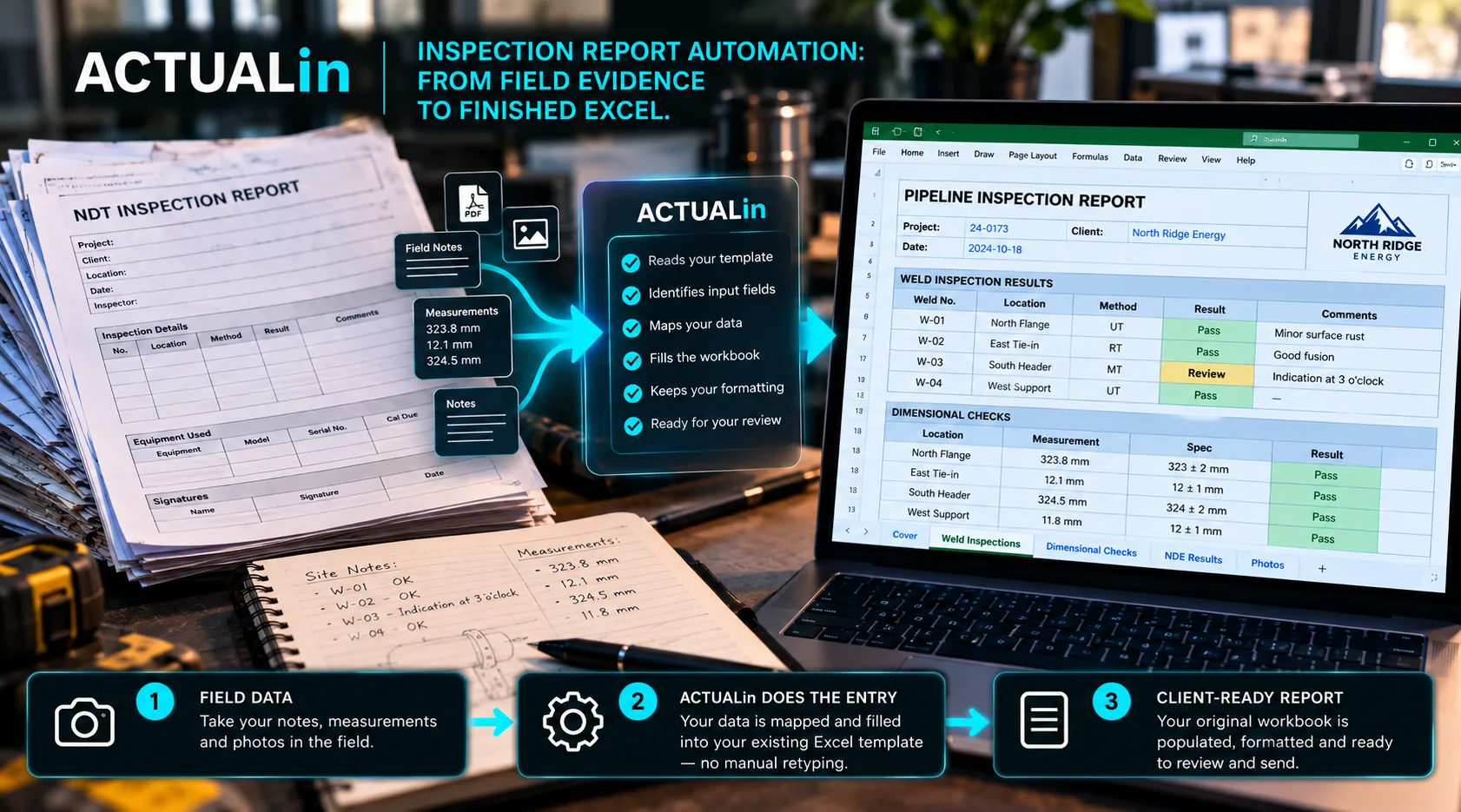
Inspection report automation transfers recorded field evidence into the correct locations of an existing report, reducing duplicate entry while retaining review. It must interpret measurements, notes, photographs and workbook structure together. The goal is not to fill every blank automatically, but to propose supported changes without damaging formulas or inventing technical decisions.
Field inspections create evidence in several forms. There may be measurements, handwritten or typed observations, asset information, pass/fail results and supporting photos. By the end of the fieldwork, much of the information needed for the report already exists.
Yet the final report can still require a separate production step. Evidence is gathered from different places, interpreted again, copied into an Excel workbook, checked against the right section and formatted for delivery. Inspection report automation is most valuable when it shortens that gap without weakening review.
Where should inspection report automation start?
Start with source evidence and its inspection context, then identify the correct workbook destinations. A common way to think about automation is to start with the blank fields in the report: find a cell and fill it. That misses the harder problem. The system first needs to understand what the field evidence means and which part of the report it supports.
A measurement without context is just a number. An observation may apply to one component but not another. A photo may document a specific condition. Reliable automation has to preserve those relationships as information moves into the report.
Step 1: collect the evidence once
The first opportunity is simple: avoid creating information twice. If a technician has already recorded a measurement or observation in the field, the reporting process should reuse that evidence rather than require the same fact to be typed again solely because the final deliverable is Excel.
This does not require every inspection to use one rigid data-entry form. The evidence can still reflect the way the work is actually performed, provided the reporting workflow can interpret it safely.
Step 2: understand the destination workbook
The existing Excel report provides another kind of context. Labels, sections, formulas, repeated areas and formatting describe where information belongs and which parts of the workbook should not be changed.
Before generating anything, the system should identify intended input locations and protect authored workbook logic. A report with formulas or merged structures cannot safely be handled as a flat list of cells.
Step 3: map evidence into proposed changes
Once the evidence and workbook are understood, the useful output is not an immediately modified file. It is a set of proposed changes that can be inspected.
Field notes + measurements + photos → workbook interpretation → proposed changes → human approval → finished Excel
That review layer makes the automation visible. A person can confirm that a value belongs in the proposed field, reject a questionable association or leave an ambiguous location untouched.
Step 4: generate without rebuilding the report
After approval, the reporting system can write the accepted information into the existing workbook. The objective should be targeted modification: populate intended input cells while preserving formulas, formatting, merged structures and authored content that were already part of the report.
This is different from exporting a newly designed report that happens to contain the same data. For teams with established Excel deliverables, preserving the workbook itself can be part of the requirement.
Where photos fit
Supporting photos are often handled as a separate reporting chore. They are captured in the field, then later sorted, resized and associated with the correct inspection item. That can recreate the same duplicate-work problem as measurements and notes.
Photo evidence should remain connected to the observation or area it supports and enter the same review workflow. The goal is not simply to insert images automatically; it is to place the right evidence in the right report context.
What should happen when the mapping is unclear?
A reporting system should not be rewarded for filling every field. When evidence could plausibly belong in more than one location, the safer behavior is to surface the uncertainty for review.
That matters because technical reporting errors are not always obvious. A realistic-looking value in the wrong section can survive a quick visual check. Controlled blanks and explicit review are often better than confident guesses.
What does a better inspection workflow look like?
The improvement is not necessarily a new inspection procedure. It can be a shorter path from work already performed to the report already required.
The technician records the evidence. The system interprets the existing workbook and evidence together. Proposed changes are reviewed. Approved information is written into the workbook. The final report remains recognizable to the customer, but much of the repetitive assembly between field and delivery is gone.
Test automation with the messy report
Real inspection workbooks are a better test than demonstration templates. Use a report with the formulas, merged cells, repeated sections and formatting your operation actually depends on. Use representative notes and photos. See what gets mapped correctly and, just as importantly, what the system refuses to assume.
Inspection report automation is useful when it survives the real workflow, not when the workflow has to be cleaned up first to make the automation look good.