 ACTUALin
EXCEL REPORT AUTOMATION · 8 MIN READ
How to Automate Excel Inspection Reports Without Rebuilding Your Template
Inspection teams often do not need another reporting format. They need a better way to get field evidence into the Excel report they already use.
Microsoft's Open XML documentation explains the structure and behavior of Excel files; the W3C provenance model explains relationships between information and its origins.
Published September 22, 2026 · ACTUALin Technical Resources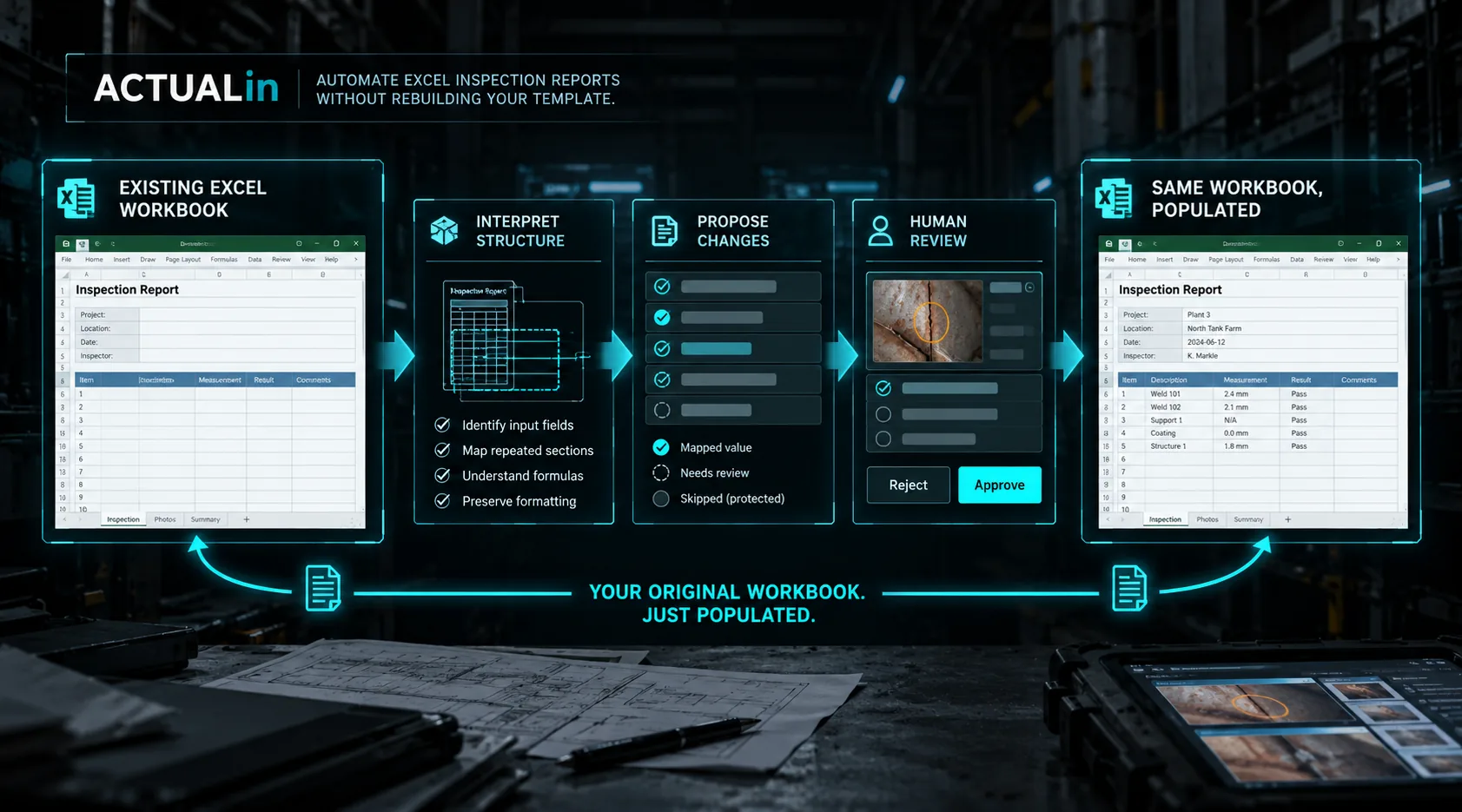
Excel inspection reports can be automated without rebuilding the customer's template by transferring recorded field evidence into approved cells of the original workbook. The process needs to interpret labels, formulas and repeated sections, propose changes and preserve the file. Human review remains responsible for uncertain associations and technical approval.
Many inspection workflows already end in a customer-approved or company-controlled Excel workbook. The inefficient part is often everything between the fieldwork and that finished report: measurements are written down, observations are captured separately, photos are collected, and then the same information is typed into Excel later.
Automating that workflow does not have to mean replacing the workbook. A useful automation system can treat the existing report as the destination, interpret the evidence that belongs in it, let a person review the proposed entries, and write only the approved information back into the original structure.
Why does rebuilding an Excel inspection template create more work?
Rebuilding a required Excel template can add migration and approval work instead of eliminating duplicate entry. Inspection reports are rarely just blank spreadsheets. They can contain formulas, merged cells, controlled labels, customer-specific layouts, repeated sections and formatting that carries meaning for the people who use the report. Recreating that document inside another reporting platform introduces another template to configure and maintain.
If the existing workbook is already accepted by the customer or reporting process, preserving it can be the simpler objective: automate the duplicate entry rather than redesign the report.
What an Excel inspection-report workflow actually has to understand
Reliable automation needs more than a list of values. It needs to determine which workbook fields are intended for input, which cells contain formulas or authored content, which repeated section a measurement belongs to, and when the evidence is too ambiguous to place safely.
The distinction between supported evidence and its correct destination matters. Writing a plausible value into the wrong inspection area is worse than leaving the field blank for review.
A practical automation workflow
A useful workflow starts with the real workbook and the real field evidence. The workbook is interpreted without redesigning it. Notes, measurements and other evidence are associated with proposed report fields. A technician reviews those proposed changes. Only approved entries are then written into the workbook.
Existing workbook + field evidence → interpretation → proposed changes → human review → completed workbook.
What should be preserved
Report automation should avoid treating the workbook as disposable output. Existing formulas, merged structures, formatting, labels and authored logic may all be part of the report itself. The safest approach is to make targeted changes to intended input locations while leaving the rest of the workbook alone.
Where human review belongs
Automation can reduce transcription without taking over technical judgment. The person responsible for the report should be able to see what the system proposes before anything is accepted into the completed workbook.
That also creates a useful failure mode: when the relationship between evidence and a report field is uncertain, the system can surface the ambiguity instead of manufacturing certainty.
Do you need to replace Excel?
Sometimes a company does want a completely new reporting platform. But if Excel is already the required deliverable, replacing it is not automatically the same thing as improving the workflow.
For teams whose main problem is retyping field evidence into an existing report, the more direct question is whether the work between evidence collection and the finished workbook can be automated safely.