 ACTUALin
NDT REPORTING · 8 MIN READ
How to Automate NDT Reports Without Replacing Your Existing Workflow
The useful question is not simply whether an NDT report can be automated. It is how much repetitive reporting work can disappear without forcing technicians to abandon the workflow and report format that already work.
NIST's metrological traceability guidance explains documented measurement relationships; the W3C provenance model explains relationships between information and its origins.
Published September 23, 2026 · ACTUALin Technical Resources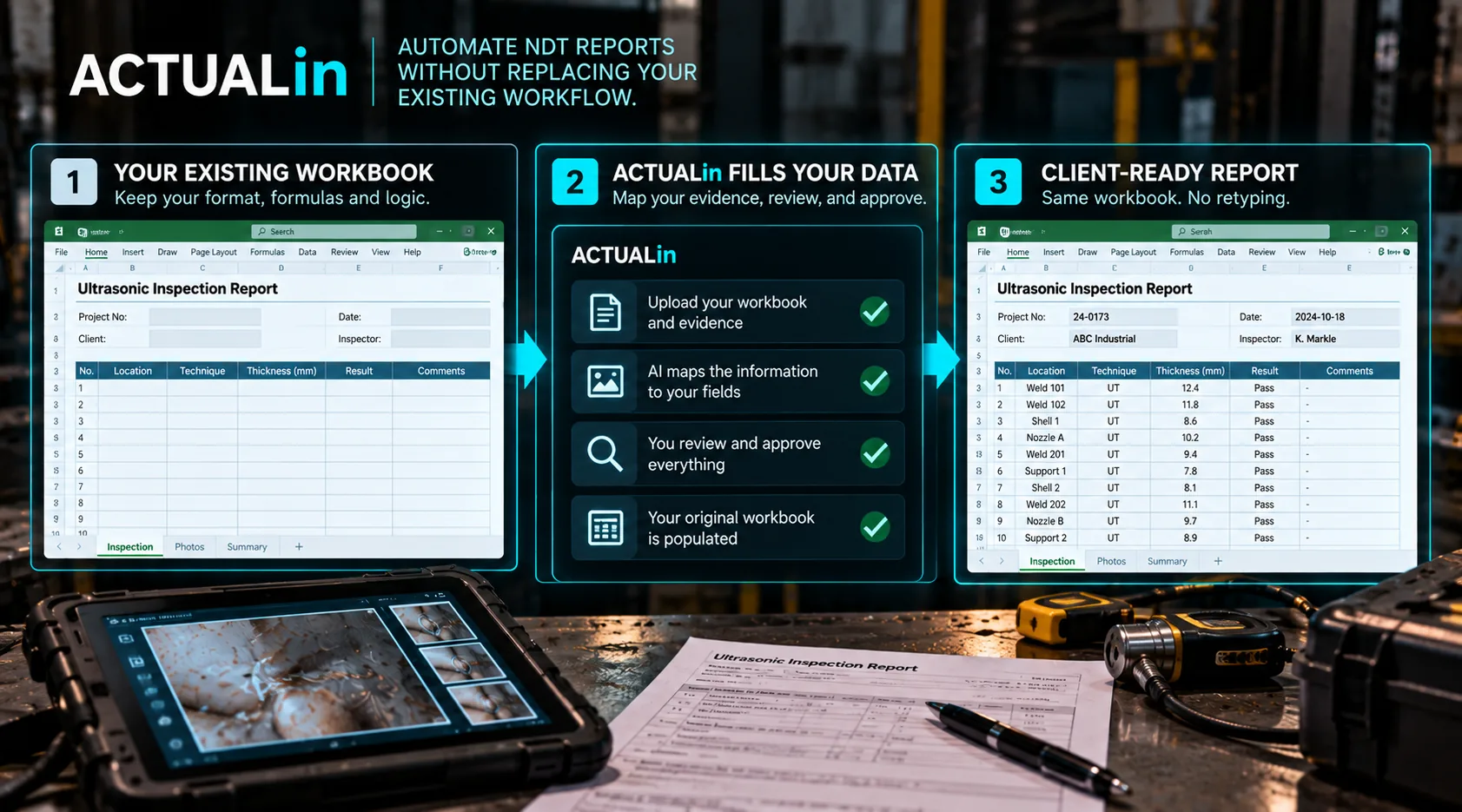
NDT reports can be automated without replacing the existing workflow by reusing recorded measurements, notes and job information in the customer-required Excel workbook. The system maps evidence to suitable fields, protects workbook logic and presents proposed changes for review. This reduces duplicate entry without taking technical decisions away from the inspector.
NDT report automation is often presented as a complete workflow replacement: move data collection into a new application, recreate the report as a digital template, train the team on a new process, and generate the final document from that system.
That can make sense when the existing process itself needs to change. But many teams have a narrower problem. The inspection is already being performed correctly. The Excel report is already accepted. The painful part is the manual bridge between field evidence and the finished report.
How can you automate NDT reports without replacing Excel?
Automate the transfer of recorded field evidence into the existing Excel report while keeping technical review in place. Look at what happens after the inspection. Measurements may be written in field notes and typed again into Excel. Asset details may be copied into several sections.
Observations may be rewritten to fit the report. Photos may be renamed, sorted and inserted manually. Information that already exists is being handled again because the report cannot use it directly.
Duplicate transfer from NDT field records to the report is the first automation target. Before changing the inspection process, identify which reporting steps exist only to move known information from one place to another.
Keep field evidence as the source
Automation works better when notes, measurements and photos are treated as evidence rather than as text that must immediately fit a form. The reporting system can then interpret that evidence in the context of the workbook and propose where it belongs.
Evidence-to-report automation preserves an important separation: technicians capture what happened in the field, while the reporting workflow handles the repetitive work of organizing that information into the deliverable.
Interpret the existing report before writing to it
A workbook should not be treated like an empty grid. NDT reports can contain formulas, merged cells, repeated inspection sections, controlled labels and customer-specific structure. Before any value is written, the system needs to understand which locations are intended for input and which are authored parts of the report.
Field evidence → workbook interpretation → proposed changes → human review → approved workbook writes
That order matters. It makes report generation the final step of a reviewed process rather than the place where the software guesses what belongs where.
Do not automate away technical review
Reducing transcription is different from delegating technical responsibility. A technician or reviewer should still be able to inspect proposed changes, reject incorrect associations and leave uncertain fields unresolved.
In technical reporting, a blank field that clearly requires attention can be safer than a confidently populated field containing the wrong evidence.
Preserve the parts of Excel that already work
If the existing workbook is the required deliverable, automation should make targeted changes rather than rebuild it from scratch. Formulas should remain formulas. Existing formatting and merged structures should survive. Authored content should stay authored content.
The goal is not to produce something that resembles the customer's report. It is to complete the report the team was already expected to deliver.
Photos belong in the same workflow
Photo evidence is often where an otherwise digital process becomes manual again. Images are captured separately, then someone has to decide which inspection area they support, resize them and place them into the final report.
A useful reporting workflow should keep that association connected to the same evidence-review process as measurements and observations rather than treating photos as an afterthought.
Measure automation by work removed
The best measure of NDT report automation is not how many features were added to the inspection process. It is how much repetitive work no longer has to happen between completing the inspection and delivering the report.
If a team can keep its established field practices, keep the workbook its customer expects, review every proposed change and spend less time re-entering information, the workflow has materially improved without requiring a wholesale replacement.
Test the real workflow, not a perfect demo
Reporting automation becomes difficult at the edges: odd workbook layouts, repeated labels, merged cells, formulas, incomplete evidence and client-specific variations. A clean demonstration template does not tell you how a system will behave with those conditions.
Use the actual workbook. Use representative field evidence. See what the system proposes. Then inspect what it refuses to assume. That is a much stronger test of whether automation fits the operation.