ACTUALinACTUALinStart free
Menu
Request a Reviewed SampleStart freeHow it worksFeaturesApplicationsResourcesData & AIPricingAboutSign in

BUILT FOR INSPECTION & TESTING TEAMS

Keep your Excel report.
Eliminate the typing.

Turn inspection notes, measurements and photos into proposed entries in the Excel report your team already uses. Review the evidence, approve the changes and generate your report.

Try Free Sandbox
Request a Reviewed Sample
i
Two ways to try ACTUALin

Free Sandbox: Create an account to test your own permitted Excel workbook.

Reviewed Sample: Ask us to evaluate your workflow. No account or file upload is required to inquire.

Your workbook stays familiar. Nothing is final without human review.

See how ACTUALin fits your industry
The inspection is finished. Why does the report still take so much work?
REAL WORKFLOW
SAME REPORT.WITHOUT THE RETYPING.

VERIFIED PHOTO-006 REPORT EXAMPLE

Every change reviewed. Uncertain evidence left out.

45 technician-approved entries, six placed photos and three withheld when the correct placement could not be confirmed.

45Cell entries approved
6Photos placed
3Photos withheld instead of guessed

The same Excel report, before and after review.

BEFORE · ORIGINAL EXCEL REPORTEquipment—Inspection location—Finding / observation—Supporting photo—
AFTER · COMPLETED EXCEL REPORTEquipmentP-401Inspection locationMechanical sealFinding / observationOil starting to seep around bottom of seal housingSupporting photoIMG_8101 · Embedded

Values and review outcomes from the verified PHOTO-006 example. Three photos were withheld instead of being placed without a confirmed report location. Simplified presentation, not a workbook screenshot.

Explore the full verified reporting example ↓
ALSO TESTED · TT-210 / ULTRASONIC THICKNESS

Complex workbook. Original formulas protected.

A separate internal synthetic test populated a three-sheet inspection workbook while retaining its authored calculations.

273Evidence-backed inputs
113 / 113Formulas unchanged
0Original values overwritten
Explore the TT-210 workbook test Internal workbook verification, not customer performance or a signed inspection approval.

PREFER A GUIDED EVALUATION?

Have us review a sample workflow.

Describe the Excel report you use and the evidence that goes into it. We'll confirm a suitable, authorized sample before evaluating what can be filled, what needs technician review and what must stay blank.

No account required to inquire · No files collected in the request · One-business-day target after acceptance, subject to scope and capacity
01Describe your reportNo upload needed yet
02Confirm a safe samplePermission and scope first
03See the reporting resultSupported fields and cautions

IN-DEPTH WORKBOOK WALKTHROUGH · PHOTO-006

Go inside the completed report.

Explore the original Excel workbook, the reviewed evidence and the generated result. Open the detailed records only when you want to inspect individual entries or photo placements.

01 / BEFORE

Your blank Excel report

INPUT CELLS EMPTY
INSPECTION REPORTXLSX
Customer—
Site—
Work Order—
Inspector—
Inspection Date—
Method—
+ NOTES AND PHOTOS

Inspection notes • 9 uploaded photos • Existing workbook

Download original inspection notes (.txt) ↗
P-401 / Mechanical Seal“Oil starting to seep around bottom of seal housing.”
P-402 / Baseplate“Corner has paint/coating loss, localized damage.”
View the original notes and photos Notes + 9 photo references

Customer: North Ridge Processing
Site: Edmonton Test Facility
Work Order: NRP-4472
Inspection Date: Oct 1 2026
Inspector: Jordan Lee
Method: Visual / mechanical

P401 · 9:12 · Mechanical Seal
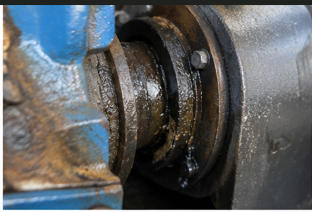
Oil starting to seep around bottom of seal housing

Disposition: MonitorPhoto Ref: IMG_8101.jpgSource photograph IMG_8101.jpgEmbedded in verified workbook
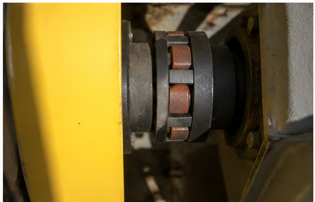
P401 · 9:14 · Coupling Guard

Secure, looks good, no deformation

Photo Ref: IMG_8102.jpgSource photograph IMG_8102.jpgEmbedded in verified workbook
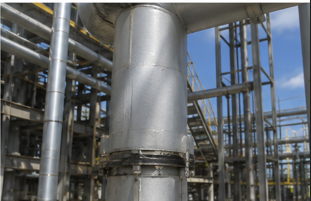
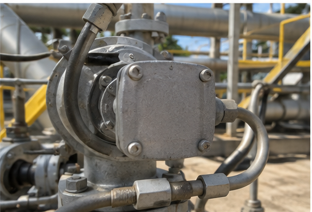
P401 · 9:18 · Overall pump/access areaPhoto Ref: IMG_8105.jpgSource photograph IMG_8105.jpgEmbedded in verified workbook
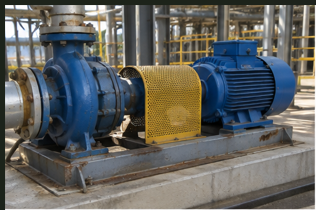
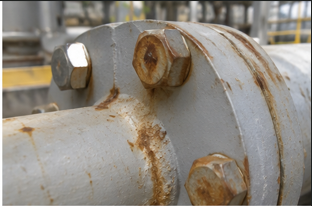
P402 · 9:26 · Discharge Flange

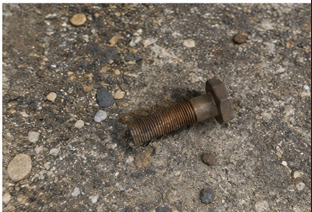
Surface rust on bolts and along bottom edge

Disposition: MonitorPhoto Ref: IMG_8103.jpgSource photograph IMG_8103.jpgEmbedded in verified workbook
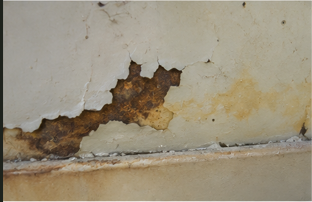
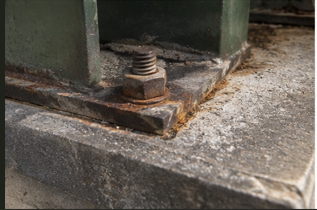
P402 · 9:29 · Baseplate

Corner has paint/coating loss, localized damage

Disposition: RepairPhoto Ref: IMG_8104.jpgSource photograph IMG_8104.jpgEmbedded in verified workbook
P402 · 9:31 · Nameplate

Readable, matches equipment

Photo Ref: IMG_8106.jpgSource photograph IMG_8106.jpgEmbedded in verified workbook
P402Photo Ref: IMG_8107.jpgSource photograph IMG_8107.jpgWithheld from workbook — no uniquely safe destination
P403 · Motor

Exterior clean, nothing visibly damaged

Photo Ref: IMG_8110.jpgSource photograph IMG_8110.jpgWithheld from workbook — no uniquely safe destination
P403

Extra context photo

Photo Ref: IMG_8111.jpgSource photograph IMG_8111.jpgWithheld from workbook — no uniquely safe destination

Source field-note values and photo filenames shown as supplied. The original photographs are separate attachments; photos without safe workbook destinations remain available for technician review.

02 / PROPOSE & REVIEW

Review & approve

TECHNICIAN APPROVAL
45Approved cell entries
6Approved image locations
3Photos withheld
EXAMPLE PROPOSED ENTRIES
CustomerNorth Ridge Processing✓ Reviewed
SiteEdmonton Test Facility✓ Reviewed
Work OrderNRP-4472✓ Reviewed
InspectorJordan Lee✓ Reviewed
SUPPORTING PHOTO PLACEMENTS
6 eligible reserved locationsApproved
3 without uniquely safe destinationsWithheld
IMG_8107.png · IMG_8110.png · IMG_8111.png

The technician approves proposed values and image placements. Ambiguous evidence is not inserted.

View actual review Proposals + image decisions

Verified PHOTO-006 result: 45 approved cell writes and six approved embedded-image placements. These are read-only examples of the reviewed data, not live approval controls.

ALL 45 APPROVED CELL WRITES — FINAL WORKBOOK

Exact target coordinates and final values, verified by comparing the populated PHOTO-006 workbook (5) with its original blank template.

1 / 45 · Inspection Report · B2North Ridge Processing
Included
2 / 45 · Inspection Report · D2Edmonton Test Facility
Included
3 / 45 · Inspection Report · F2NRP-4472
Included
4 / 45 · Inspection Report · H2Jordan Lee
Included
5 / 45 · Inspection Report · B3Oct 1 2026
Included
6 / 45 · Inspection Report · D3Visual / mechanical
Included
7 / 45 · Inspection Report · E6Oil starting to seep around bottom of seal housing.
Included
8 / 45 · Inspection Report · F6IMG_8101.png
Included
9 / 45 · Inspection Report · E7Secure, looks good, no deformation
Included
10 / 45 · Inspection Report · F7IMG_8102.png
Included
11 / 45 · Inspection Report · E8Surface rust on bolts and along bottom edge
Included
12 / 45 · Inspection Report · F8IMG_8103.png
Included
13 / 45 · Inspection Report · E9Corner has paint/coating loss, localized damage
Included
14 / 45 · Inspection Report · F9IMG_8104.png
Included
15 / 45 · Inspection Report · D14Readable, matches equipment.
Included
16 / 45 · Inspection Report · E14IMG_8106.png
Included
17 / 45 · Photo Evidence Register · A2IMG_8101.png
Included
18 / 45 · Photo Evidence Register · B2P401
Included
19 / 45 · Photo Evidence Register · C2PIC-6101
Included
20 / 45 · Photo Evidence Register · D2Mechanical Seal
Included
21 / 45 · Photo Evidence Register · F2Oil starting to seep around bottom of seal housing.
Included
22 / 45 · Photo Evidence Register · A3IMG_8102.png
Included
23 / 45 · Photo Evidence Register · B3P401
Included
24 / 45 · Photo Evidence Register · C3PIC-6102
Included
25 / 45 · Photo Evidence Register · D3Coupling Guard
Included
26 / 45 · Photo Evidence Register · F3Secure, looks good, no deformation
Included
27 / 45 · Photo Evidence Register · A4IMG_8103.png
Included
28 / 45 · Photo Evidence Register · B4P402
Included
29 / 45 · Photo Evidence Register · C4PIC-6103
Included
30 / 45 · Photo Evidence Register · D4Discharge Flange
Included
31 / 45 · Photo Evidence Register · F4Surface rust on bolts and along bottom edge
Included
32 / 45 · Photo Evidence Register · A5IMG_8104.png
Included
33 / 45 · Photo Evidence Register · B5P402
Included
34 / 45 · Photo Evidence Register · C5PIC-6104
Included
35 / 45 · Photo Evidence Register · D5Baseplate
Included
36 / 45 · Photo Evidence Register · F5Corner has paint/coating loss, localized damage
Included
37 / 45 · Photo Evidence Register · A6IMG_8106.png
Included
38 / 45 · Photo Evidence Register · B6P402
Included
39 / 45 · Photo Evidence Register · C6OBS-6106
Included
40 / 45 · Photo Evidence Register · D6Nameplate
Included
41 / 45 · Photo Evidence Register · F6Readable, matches equipment.
Included
42 / 45 · Photo Evidence Register · A7IMG_8105.png
Included
43 / 45 · Photo Evidence Register · B7P-401
Included
44 / 45 · Photo Evidence Register · C7OBS-6105
Included
45 / 45 · Photo Evidence Register · D7Area Overview
Included
APPROVED PHOTO PLACEMENTS · PHOTO EVIDENCE
Reviewed evidence IMG_8101.png
IMG_8101.pngP-401 · Mechanical SealRecord PIC-6101 · A4:D13✓ Approved placement
Reviewed evidence IMG_8102.png
IMG_8102.pngP-401 · Coupling GuardRecord PIC-6102 · E4:H11✓ Approved placement
Reviewed evidence IMG_8103.png
IMG_8103.pngP-402 · Discharge FlangeRecord PIC-6103 · A17:C29✓ Approved placement
Reviewed evidence IMG_8104.png
IMG_8104.pngP-402 · BaseplateRecord PIC-6104 · D17:H26✓ Approved placement
Reviewed evidence IMG_8105.png
IMG_8105.pngP-401 · Area OverviewRecord OBS-6105 · A33:E41✓ Approved placement
Reviewed evidence IMG_8106.png
IMG_8106.pngP-402 · NameplateRecord OBS-6106 · F33:H45✓ Approved placement
WITHHELD FROM COMPLETED WORKBOOK
Unresolved evidence IMG_8107.png
IMG_8107.pngP-402No component-level association given⚠ Withheld — requires clarification
Unresolved evidence IMG_8110.png
IMG_8110.pngP-403 · MotorNo authorized reserved image location⚠ Withheld — requires clarification
Unresolved evidence IMG_8111.png
IMG_8111.pngP-403 · Extra contextNo uniquely safe image destination⚠ Withheld — requires clarification

This is a read-only reconstruction of verified PHOTO-006 review outcomes. No original review-screen capture or complete item-by-item proposal log is being represented as available.

03 / GENERATED OUTPUT

Your completed Excel report

ORIGINAL XLSX
INSPECTION REPORTXLSX
CustomerNorth Ridge Processing
SiteEdmonton Test Facility
Work OrderNRP-4472
InspectorJordan Lee
Inspection DateOct 1 2026
MethodVisual / mechanical
PHOTO EVIDENCE · 6 EMBEDDED
P-401 Mechanical Seal inspection evidenceIMG_8101.pngP-401 · Mechanical Seal
P-401 Coupling Guard inspection evidenceIMG_8102.pngP-401 · Coupling Guard
P-402 Discharge Flange inspection evidenceIMG_8103.pngP-402 · Discharge Flange
P-402 Baseplate inspection evidenceIMG_8104.pngP-402 · Baseplate
P-401 Area Overview inspection evidenceIMG_8105.pngP-401 · Area Overview
P-402 Nameplate inspection evidenceIMG_8106.pngP-402 · Nameplate

Actual photographs extracted from the verified completed Excel workbook, associated with their reserved destinations.

45 approved entries6 embedded photos3 unresolved photos withheld

Based on ACTUALin PHOTO-006 verification. This is a simplified visual representation of actual tested workbook values and review outcomes, not a screenshot of the Excel file. The tested workbook retained its authored structure, layout and existing content.

WHO USES ACTUALin?

Different industries. Same reporting bottleneck.

The evidence changes. The manual reporting work doesn't.

1 / 29
Inspection & Testing

NDT & Industrial Inspection

WHO NDT technicians, inspection supervisors

USE UT readings, inspection notes and photos into existing inspection reports.

Inspection & Testing

Welding & Fabrication

WHO Weld inspectors, fabrication QA/QC teams

USE Weld IDs, VT/MT/PT findings and reinspection records.

Inspection & Testing

Manufacturing & Production

WHO Quality inspectors, production technologists

USE Dimensional checks, nonconformances and lot inspection records.

Business & Administration

Retail, Hospitality & Nonprofits

WHO Store managers, coordinators, nonprofit teams

USE Stock checks, event records and operational tracking sheets.

Business & Administration

Education & Training

WHO Training coordinators, program administrators

USE Attendance sheets, equipment logs and training records.

BUILT FROM INDUSTRY EXPERIENCE

Technical reporting, understood firsthand.

Founded by a Certified Engineering Technologist with seven years of experience in industrial R&D, materials testing and QA/QC. Built to reduce repetitive report entry while keeping technical review in human hands.

Meet the founder

PLANS

Start small. Scale when the reporting volume does.

Choose the operating range that fits your team now. Move up when the workload does.

01

Free

C$01 USER
No analysis limit sandbox
24-hour report storage
View & share results
One verified Free Excel report download
Start free
03

Business

C$399 / monthInvite your team · up to 25 users
250 reports / month
Download completed Excel
Persistent shared workspace
Create account
FLEX CAPACITY

Flex

COMING SOONCUSTOM RANGE
More users & reports
Custom operating capacity
Tailored to your operation
View details
Free lets you test and download once.
Crew supports ongoing reporting.
Test your own Excel inspection workbook in the 24-hour Free sandbox with no analysis limit. Review proposed entries, inspect the generated report and share a temporary read-only preview. Eligible verified Free users can download one completed Excel report; Crew adds ongoing downloads and persistent team history.
Paid plans are month to month with cancellation through the billing portal. Checkout powered by Stripe. Flex is coming soon for teams needing more capacity. Billing and cancellation details

COMMON QUESTIONS

Questions before you try it.

Your workbook, your evidence and who stays in control.

Will it work with my Excel template?

ACTUALin is built for existing .xlsx inspection reports. Template structures vary, so review the proposed mappings with your real report before relying on it in production.

Does ACTUALin decide pass or fail?

No. ACTUALin proposes report entries from the evidence provided. The qualified technician reviews the content and remains responsible for the inspection decision.

What changes in my report?

Your existing Excel workbook stays the report format, including supported layouts, formatting and formulas. You review and approve the suggested entries before generating the completed workbook.

Are our reports private?

Yes. Your company workspace is private by default: saved reports, templates and history are accessible to authorized workspace members, not published to a public report database. Team members must have verified accounts. Free Sandbox users can choose to create a temporary read-only share link; anyone with that link may view that specific shared preview until it expires. Read how reporting data is handled.

Is there an audit trail?

ACTUALin records reporting decisions, including approved and rejected entries, their supporting evidence and reviewer details. These records help your team trace what was changed when a report was generated.

What if the evidence is missing or unclear?

ACTUALin flags uncertain associations for review rather than guessing. If an entry cannot be safely supported or mapped, the technician must verify it or leave it blank.

Who approves proposed entries?

An authorized person reviews the proposed entries before the completed workbook is generated. ACTUALin does not replace the qualified technician’s judgment or sign-off.

What happens to Free Sandbox reports after 24 hours?

The Free Sandbox keeps reporting data for 24 hours. Save what you need before it expires. Paid plans provide persistent report history, subject to the applicable retention terms.

How do we try it?

Request a reviewed sample evaluation without creating an account, explore verified demonstrations, or test your own permitted workbook in the Free Sandbox. Eligible verified Free users can download one completed Excel report. Team pilots are available by arrangement.

Do we have to migrate our reporting system?

No. ACTUALin starts with the Excel report your team already uses instead of requiring a new report format.

READY TO TRY IT?

See what ACTUALin can do with your Excel report.

Try it yourself

Upload your workbook and test it in the Free Sandbox.

Try Free Sandbox

Want us to evaluate it?

Describe your report and request a reviewed sample.

Request a Reviewed Sample